RFC 826 - Understanding ARP Behavior on L2 Switches: A Comprehensive Guide
This article examines the ARP protocol's behavior on Layer 2 (L2) switches, focusing on how switches discover and store MAC addresses using a MAC Address Table. It also highlights the role of Spanning Tree Protocol (STP) in preventing network loops and ensuring the stability of the MAC Address Table.

In a previous article, we explored the ARP protocol and its operation on endpoints. In this article, we will delve into how ARP functions on Layer 2 (L2) switches, focusing on how these switches manage and store MAC addresses.
Key Facts About Switches
Before discussing ARP on switches, it's important to understand a few key points:
- MAC Address Allocation: Each switch interface is assigned a unique MAC address.
- MAC Address Table: Unlike Layer 3 (L3) devices, L2 switches do not store MAC addresses in an ARP table. Instead, they maintain a MAC Address Table, as L2 devices cannot store Layer 3 information.
Network Setup and ARP Operation
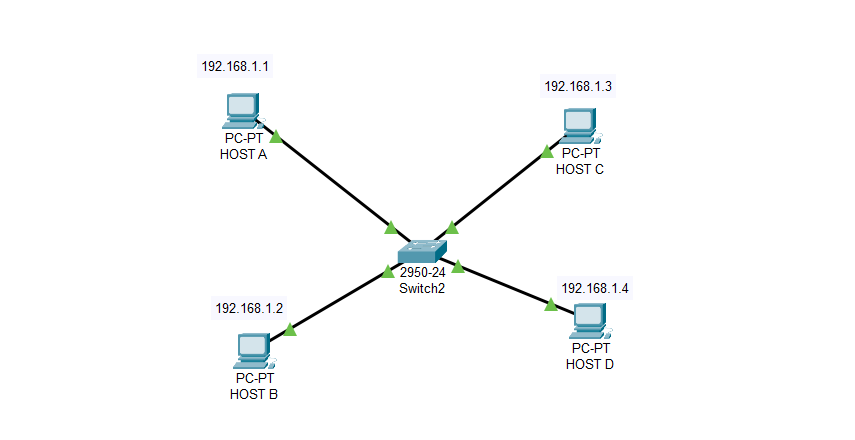
Packet Tracer example
Using Packet Tracer, we defined a network to analyze how a switch discovers and stores MAC addresses. The scenario involves sending an ICMP echo request from Host A to Host B. Initially, the switch broadcasts the request to all network devices, as it does not yet know which devices are connected to its interfaces.
At this stage, the switch records Host A's MAC address in its MAC Address Table. The table can be viewed using the following command:
switch# show mac-address-table
When Host B receives the frame, it sends an ARP reply to Host A. The switch then updates its MAC Address Table with Host B's MAC address, enabling direct communication between Hosts A and B without further broadcasts.
Example of a Switch MAC Address Table
After the ARP process, the MAC Address Table on the switch may look something like this:
sql
Copy code
Vlan    Mac Address    Type     Ports
----    -----------    -------- -----
1       0001.966a.e016 DYNAMIC  Fa0/1
1       0001.c9b8.b8c2 DYNAMIC  Fa0/2
Spanning Tree Protocol (STP)
While analyzing ARP behavior, you'll also observe the Spanning Tree Protocol (STP) in action on the switch. STP is a Layer 2 protocol designed to prevent network loops. In Packet Tracer's simulation mode, STP frames are broadcast every 10-15 seconds. Disabling STP can prevent the switch from maintaining its MAC Address Table properly.